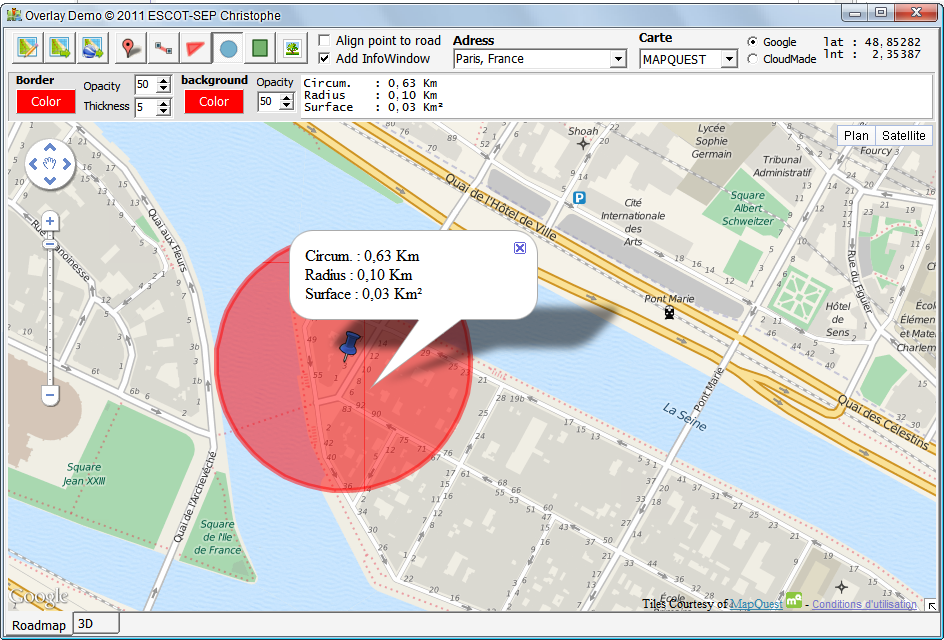
Une InfoWindow est une bulle d'information pouvant
contenir du texte HTML, elles sont accessibles au travers
de la liste InfoWindows de type TECMapInfoWindows
 Fig. 40 Une infowindow
associée à un cercle
Fig. 40 Une infowindow
associée à un cercle
TECMapInfoWindows
Cette classe dispose des méthodes et propriétés
function Add(sContent:string):integer;
Ajoute une infowindow
le contenu peut-être du texte brut ou du
Html
31
procedure
Clear;
Efface toutes les infowindows
procedure
Delete(index:integer);
Supprime l'infowindow dont on passe l'index
property
Count:integer;
Retourne le nombre de marker dans la liste
property
InfoWindow[index:integer]:
TECMapInfoWindow;
Tableau permettant l'accès aux infowindows, c'est la
propriété par défaut donc vous pouvez y accéder
directement par
map.InfoWindows[index] au lieu de
map.InfoWindows.InfoWindow[index]
property
ToKml : string;
Propriété en
lecture
seule qui retourne une string au
format Kml contenant la liste des infowindows
property
ToTxt : string;
Propriété en
lecture/écriture qui donne accès à
la liste des infowindows dans un format texte.
En écriture il s'agit d'un ajout et non d'un
remplacement, si vous ne souhaitez pas conserver
les anciennes valeurs faites un
Clear avant
l'ajout
32
TECMapInfoWindow
Les infowindows disposent des méthodes et
propriétés
procedure
setPosition(const
dLatitude,dLongitude:double);
Déplace l'infowindow en
Latitude,Longitude
Non disponible sous CloudMade
11
property
Anchor : integer;
Propriété en
lecture/écrite qui associe une
infowindow à un
marker
Sous CloudMade les infowindows doivent
obligatoirement être associées à un marker pour
pouvoir s'afficher
10
property
Content : string;
Propriété en lecture/écrite définissant le
contenu de l'infowindow
property
Latitude :
double;
Propriété en lecture/écrite donnant accès à la
latitude
Non disponible sous CloudMade
12
property
Longitude:
double;
Propriété en lecture/écrite donnant accès à la
longitude
Non disponible sous CloudMade
13
property
MaxWidth :
integer;
Propriété en lecture/écrite permettant de
définir la largeur maximale que peut atteindre
l'infowindow
Non disponible sous CloudMade
14
property
Open : boolean
Propriété en lecture/écrite permettant
d'ouvrir/fermer une infowindow
La fermeture d'une infowindow déclenche
l'évènement OnCloseInfoWindow
property
Zindex : integer;
Propriété en lecture/écrite, attribut un indice
de priorité pour l'affichage de l'infowindow, une
infowindow ayant un Zindex plus élevé sera affichée
par dessus un Zindex inférieur
property
Index : integer;
Indice de l'infowindow dans sa liste
property
ToKml : string;
Propriété en
lecture
seule qui retourne une string au
format Kml contenant l'infowindow
property
ToTxt : string;
Propriété en lecture/écriture qui donne accès à
l'infowindow dans un format texte.
OnCloseInfoWindow
Évènement déclenché à la fermeture d'une
infowindow
procedure
OnCloseInfoWindow(sender: Tobject;const
Index:integer)
Différence entre API
Sous CloudMade pour être
affichée une infowindow doit obligatoirement être
associée à un
marker
bmp := TBitmap.Create;
try
if
FMapillaryLayer.LoadMapillaryBitmap(Sequence[ImageIndex].Url256,bmp)
then
Image.Picture.Assign(bmp);
finally
bmp.Free;
end;
Alors que sous Google Maps vous pouvez directement
ouvrir une infowindow sans l'associer à un marker